WinDirStat: Windows disk space & directory statistics
DownloadWinDirStat is a disk-usage visualization and housekeeping companion for Microsoft Windows desktops and servers. Each run performs one exhaustive scan of the folder hierarchy you select, then stitches the measurements into three synchronized views:
- The directory list mirrors Explorer’s tree yet ranks rows by bytes consumed so you instantly see which folders—and nested subtrees—dominate usage.
- The treemap paints every file at once inside nested rectangles so the entire scanned branch is visible without paging through dialogs.
- The extension list doubles as a legend and aggregates statistics so you understand how treemap colors map to document, media, or archive categories.
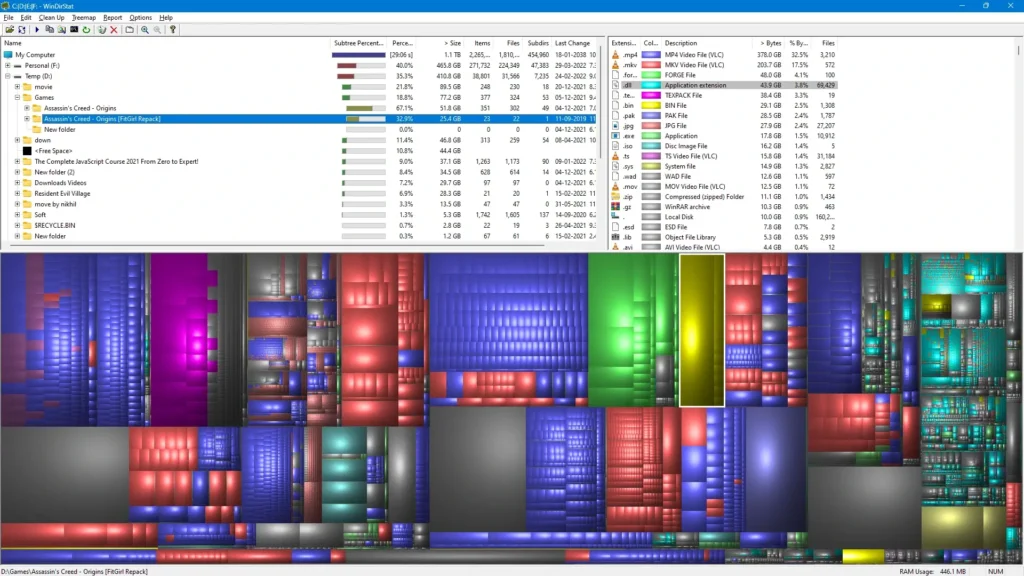
Within the treemap each file becomes a shaded tile whose footprint scales with its byte count. Parent folders nest additional tiles so every directory boundary becomes a larger region enclosing its descendants—meaning subtree weight is proportional to visible area. Hue encodes file category according to the extension legend, while cushioned gradients emphasize how deeply folders stack inside one another without hiding nested clutter.
Common questions about WinDirStat downloads & usage
- What does WinDirStat offer Windows users?
- WinDirStat is a no-cost disk-space explorer for Microsoft Windows that charts bloated directories, renders an interactive treemap, and summarizes consumption by extension so SSD and HDD clutter becomes obvious.
- Can I inspect or redistribute WinDirStat’s source?
- Absolutely—the program remains licensed under the GNU General Public License version 2 (GPLv2), which permits personal use, auditing, and redistribution when you honor the license text.
- Will WinDirStat remove data without my confirmation?
- No. Walking the filesystem is strictly read-only until you deliberately invoke cleanup helpers; nothing is erased silently in the background.
- Where do I grab installers or silent-install commands?
- Choose the MSI bundle or portable ZIP referenced on the Downloads page, or automate deployment with winget (
WinDirStat.WinDirStat) or Scoop (extras/windirstat) when that fits your workflow.